
🛠️ 接口引擎实战
实战教程集合,通过接口引擎实现各种业务场景
| 实战项目 | 链接 |
|---|---|
| 发送第三方短信 | CSDN |
| 发送阿里云短信 | CSDN |
| 自定义导出 Excel | CSDN |
| 微信小程序授权手机号登录 | CSDN |
| 微信 v3 支付 JSAPI 下单 | CSDN |
| 微信支付回调接口 | CSDN |
| MongoDB 相关操作 | CSDN |
更多平台内置接口引擎详见
https://web.microi.net/#/api-engine
日期相关处理
- 在【系统设置】->【开发配置】->【全局前端V8引擎、全局服务器端V8引擎】增加【DateFormat、DateAdd、DateNow】相关函数
展开查看 JavaScript 代码(120 行)
js
function DateNow(format) {
  var time = new Date();
  if (!format) {
    var year = time.getFullYear();
    var month = time.getMonth() + 1;
    var day = time.getDate();
    var hh = time.getHours();
    var mm = time.getMinutes();
    var ss = time.getSeconds();
    return year + '-'
            + (month > 9 ? month : '0' + month) + '-'
            + (day > 9 ? day : '0' + day) + ' '
            + (hh > 9 ? hh : '0' + hh) + ':'
            + (mm > 9 ? mm : '0' + mm) + ':'
            + (ss > 9 ? ss : '0' + ss);
  }

  var year = time.getFullYear();
  var month = ('0' + (time.getMonth() + 1)).slice(-2);
  var day = ('0' + time.getDate()).slice(-2);
  var hours = ('0' + time.getHours()).slice(-2);
  var minutes = ('0' + time.getMinutes()).slice(-2);
  var seconds = ('0' + time.getSeconds()).slice(-2);

  var formattedDate = format;

  formattedDate = formattedDate.replace('yyyy', year);
  formattedDate = formattedDate.replace('MM', month);
  formattedDate = formattedDate.replace('dd', day);
  formattedDate = formattedDate.replace('HH', hours);
  formattedDate = formattedDate.replace('mm', minutes);
  formattedDate = formattedDate.replace('ss', seconds);

  return formattedDate;
}
//传入日期或字符串类型的time
function DateFormat(time, format) {
  if (!time) {
    return null;
  }
  if (typeof time === 'string') {
    time = new Date(time);
  }
  if (!format) {
    format = 'yyyy-MM-dd HH:mm:ss';
  }

  var year = time.getFullYear();
  var month = ('0' + (time.getMonth() + 1)).slice(-2);
  var day = ('0' + time.getDate()).slice(-2);
  var hours = ('0' + time.getHours()).slice(-2);
  var minutes = ('0' + time.getMinutes()).slice(-2);
  var seconds = ('0' + time.getSeconds()).slice(-2);

  format = format.replace('yyyy', year);
  format = format.replace('MM', month);
  format = format.replace('dd', day);
  format = format.replace('HH', hours);
  format = format.replace('mm', minutes);
  format = format.replace('ss', seconds);

  return format;
}
function DateAdd(startTime, strInterval, number, format) {
  var dtTmp = new Date(startTime);
  var realFormat = format || 'yyyy-MM-dd HH:mm:ss';

  if (typeof number === 'string') {
      number = parseInt(number, 10);
  }

  var result = new Date(dtTmp);
  switch (strInterval) {
      case 's': //秒
          result.setSeconds(result.getSeconds() + number);
          break;
      case 'n': //分(这里'n'和'm'重复了,我保留'n'作为分钟,但通常使用'm')
      case 'm': //分
          result.setMinutes(result.getMinutes() + number);
          break;
      case 'h': //小时
      case 'H': //小时('H'通常用于24小时制,但这里我们不做区分)
          result.setHours(result.getHours() + number);
          break;
      case 'd': //天
          result.setDate(result.getDate() + number);
          break;
      case 'w': //周
          result.setDate(result.getDate() + number * 7);
          break;
      case 'q': //季
          result.setMonth(result.getMonth() + number * 3);
          break;
      case 'M': //月
          var month = result.getMonth() + number;
          var year = result.getFullYear();
          var day = result.getDate();
          result.setMonth(month);
          // 如果日期溢出,则设置为该月的最后一天
          if (result.getDate() !== day) {
              result.setDate(0); // 设置为上个月的最后一天,然后加1天得到本月的最后一天
          }
          // 如果年份变了(比如从12月增加到下一年1月前的情况),则调整年份
          if (result.getMonth() === month - number && result.getMonth() !== 11) {
              result.setFullYear(year + 1);
          }
          break;
      case 'y': //年
          result.setFullYear(result.getFullYear() + number);
          break;
  }

  // 处理闰年2月29日增加月份或天数后变为3月1日或类似情况
  if (dtTmp.getMonth() === 1 && dtTmp.getDate() === 29 && (result.getMonth() !== 1 || result.getDate() !== 29)) {
      // 如果原日期是2月29日,且结果不是2月29日,则调整为2月的最后一天(平年是28天)
      result.setDate(28);
  }

  return DateFormat(result, realFormat);
}日期格式化
js
var result = DateFormat(new Date(), 'yyyy-MM-dd HH:mm:ss');日期加减
js
var result = DateAdd(new Date(), 'd', 1, 'yyyy-MM-dd HH:mm:ss');//增加1天,返回'yyyy-MM-dd HH:mm:ss'
var result = DateAdd(new Date(), 'd', -1, 'yyyy-MM-dd');//减少1天,返回'yyyy-MM-dd'
var result = DateAdd(new Date(), 'M', 1, 'yyyy-MM-dd');//增加1个月,返回'yyyy-MM-dd'_Where条件日期比较大小
js
//如果日期字段是yyyy-MM-dd HH:mm:ss格式
var result = V8.FormEngine.GetTableData('Sys_User', {
    _Where: [
        ['CreateTime', '>', DateFormat(new Date(), 'yyyy-MM-dd HH:mm:ss')]
    ]
})
//如果日期字段是yyyy-MM-dd格式
var result = V8.FormEngine.GetTableData('Sys_User', {
    _Where: [
        ['JiaoyiDate', '>', DateFormat(item.日期字段, 'yyyy-MM-dd')]
    ]
})自定义导出Excel
- 目前平台的通用导出功能是直接导出表格展现的字段以及内容,某些情况下并不满足复杂业务逻辑导出的需求,因此提供了两种自定义导出方式
- 2024-11-04开始支持导出单图、多图,且多图会自动生成列、合并列,通过计算定位自动浮在表格上对应的单元格
- 2026-06-24开始支持一次导出多个页签:传入
ExcelSheets或Sheets数组即可。老的ExcelData + ExcelHeader写法保持单页签导出不变。- 2026-07-20开始支持
ExcelOptions工作表配置,以及ExcelHeader的列宽、行高、隐藏、自动宽度、数字格式和列级样式。完整参数以 后端V8:V8.Office 导出 Excel 为准。- 导出的ExportExcel()方法源码公开在【Microi.Office】插件源码中
效果图
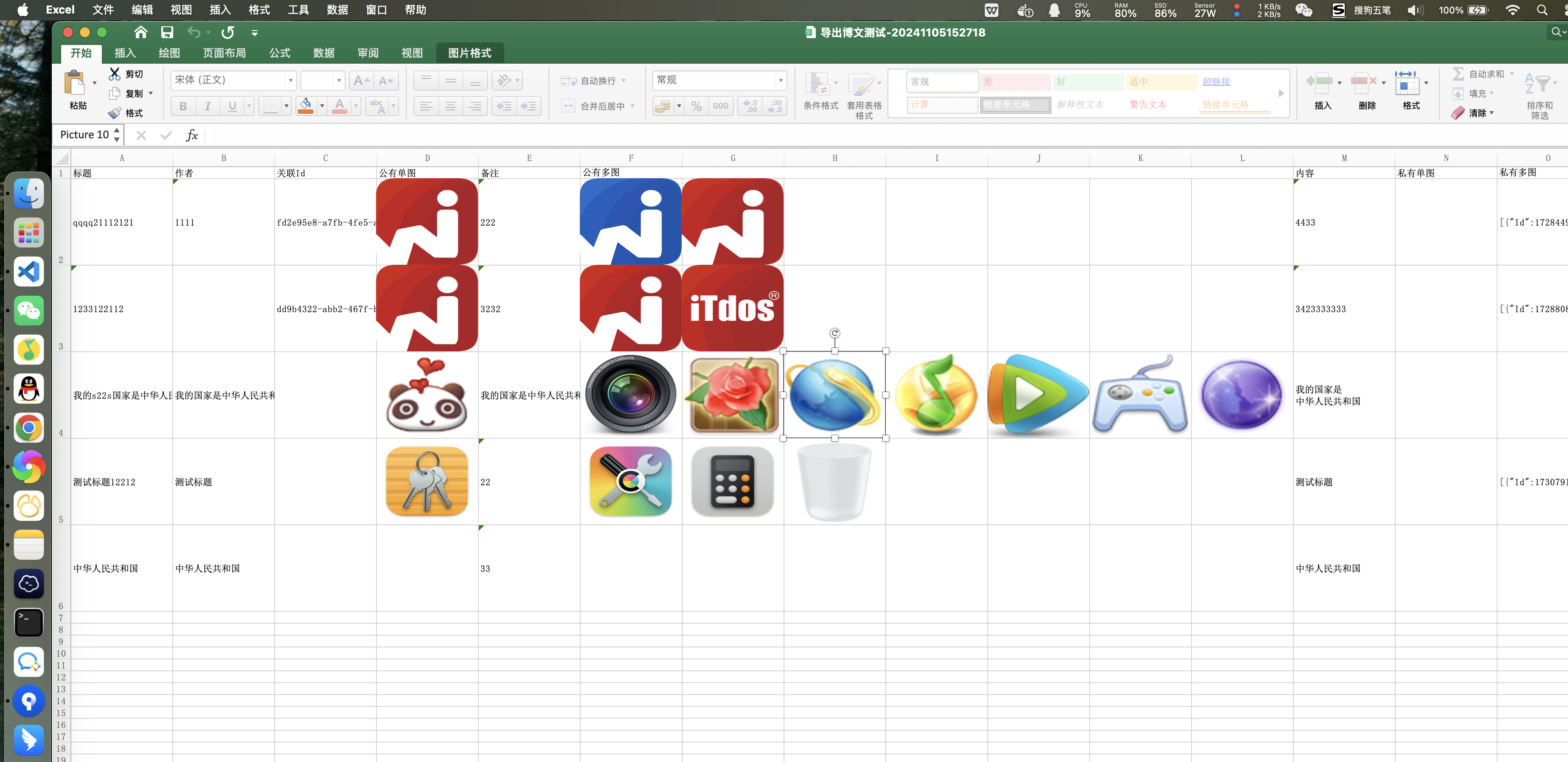
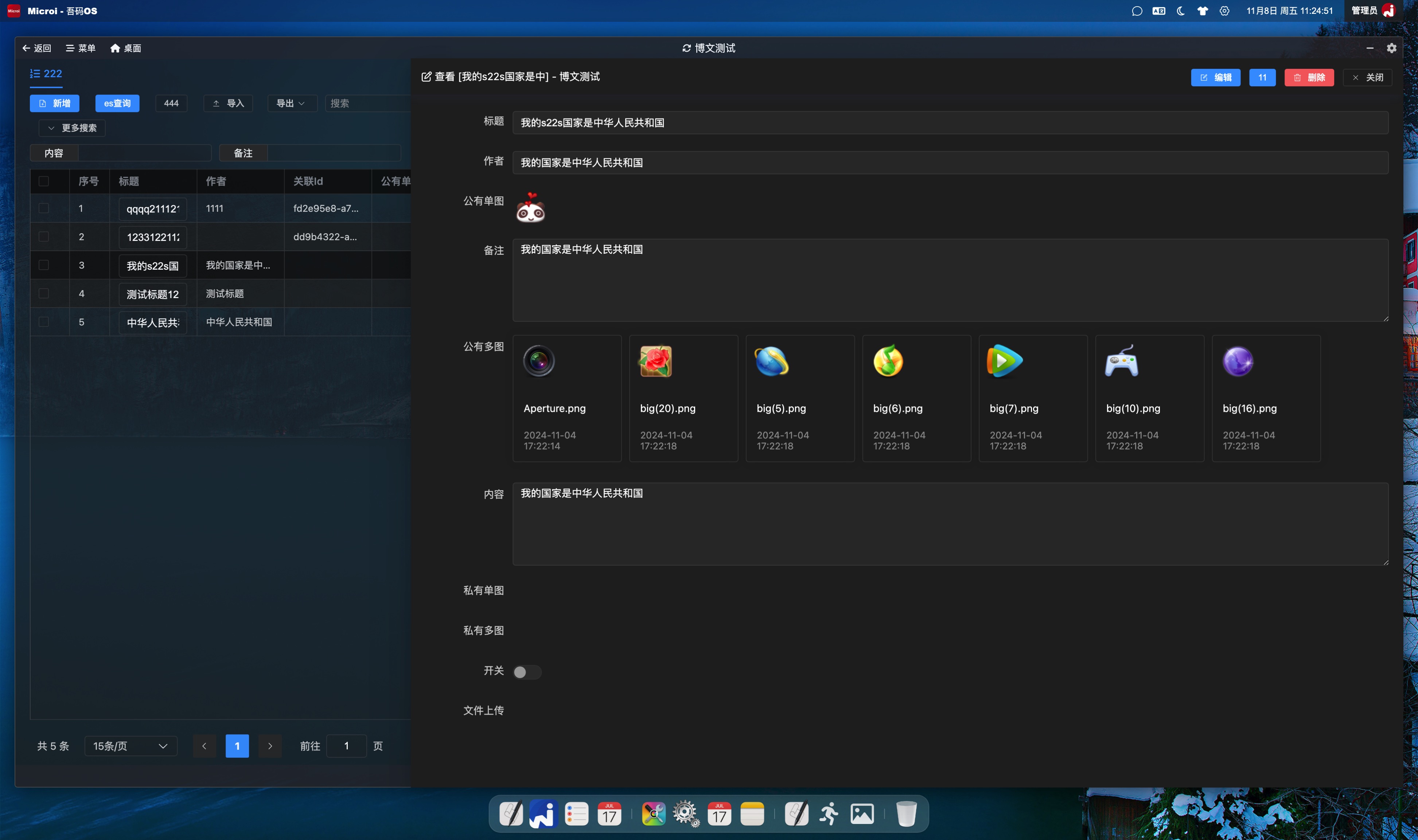
使用接口引擎替换导出接口
将接口地址配置到后台菜单的【导出接口替换】后,登录用户发起导出时,平台会自动通过 Authorization: Bearer <DiyToken> 请求头携带身份。因此接口引擎应保持【允许匿名调用】关闭,并开启【响应文件】;不要通过开放匿名调用绕过 Token 校验。失败响应会显示接口返回的真实 Msg,并自动结束导出按钮的 Loading 状态。
展开查看 JavaScript 代码(49 行)
javascript
//新建一个接口引擎,代码如下:
//动态设置数据源
var dataListResult = V8.FormEngine.GetTableData('diy_blog_test', {
    _Where : [[ 'Xingming', 'Like', '张三' ]]
});
if(dataListResult.Code != 1){
    return dataListResult;
}
var dataList = dataListResult.Data;
//动态设置表头,数据可来源于【diy_field】表,也可以自己组装,这里使用JOSN示例数据
var header = [{
  Name: 'Biaoti', Label : '标题', Component : 'Text', Width: 30,
  HeaderStyle: { BackgroundColor: '17365D', FontColor: 'FFFFFF' },
  Style: { WrapText: true }
},{
  Name: 'ImgUpload57', Label : '公有单图', Component : 'ImgUpload',
  //传入Config.ImgUpload.Multiple=1会自动处理多图生成列、合并列,且通过计算定位自动浮在表格上对应的单元格
  Config : `{
    ImgUpload:{
      Multiple : 0,  //是否多图
      Limit : 0,  //公有还是私有
    }
  }`
},{
  Name: 'ImgUpload64', Label : '公有多图', Component : 'ImgUpload',
  Config : `{
    ImgUpload:{
      Multiple : 1,  //是否多图
      Limit : 0,  //公有还是私有
    }
  }`
}];
//导出excel。注:ExportExcel()方法的源码公开在【Microi.Office】插件源码中。
var excelResult = V8.Office.ExportExcel({
  OsClient : V8.OsClient,
  ExcelData : dataList,//传入动态数据源
  ExcelHeader : header,//传入动态表头
  ExcelOptions : {
    SheetName : '测试数据',
    DefaultColumnWidth : 14,
    HeaderRowHeight : 30,//磅(pt)
    DataRowHeight : 24,//磅(pt)
    FreezeHeader : true,
    AutoFilter : true,
    HeaderStyle : { Bold: true, HorizontalAlignment: 'Center' }
  }
});
if(excelResult.Code != 1){
  return excelResult;
}
var excelByte = excelResult.Data;
//返回文件流。注意:接口引擎必须开启【响应文件】
return {
  Code : 1,
  Data : {
    FileName : '测试接口引擎导出excel.xlsx',
    ContentType : 'application/vnd.openxmlformats-officedocument.spreadsheetml.sheet',
    FileByteBase64 : System.Convert.ToBase64String(excelByte)
  }
};导出多页签
展开查看 JavaScript 代码
javascript
// 每个页签都可以有独立的数据源和表头。
// ExcelSheets 也可以写成 Sheets。
var excelResult = V8.Office.ExportExcel({
  OsClient : V8.OsClient,
  ExcelOptions : {
    DefaultColumnWidth : 14,
    HeaderRowHeight : 28,
    HeaderStyle : { Bold: true, BackgroundColor: 'D9EAF7' }
  },
  ExcelSheets : [{
    SheetName : '五金计划',
    ExcelData : wujinList,
    ExcelHeader : wujinHeader,
    ExcelOptions : { FreezeHeader: true, AutoFilter: true }
  },{
    SheetName : '喷塑计划',
    ExcelData : pensuList,
    ExcelHeader : pensuHeader
  }]
});
if(excelResult.Code != 1){
  return excelResult;
}
return {
  Code : 1,
  Data : {
    FileName : '生产计划_' + DateNow('yyyyMMddHHmmss') + '.xlsx',
    ContentType : 'application/vnd.openxmlformats-officedocument.spreadsheetml.sheet',
    FileByteBase64 : System.Convert.ToBase64String(excelResult.Data)
  }
};外层 ExcelOptions 会作为所有页签的默认配置,页签内 ExcelOptions 只覆盖已传属性。列级可配置 Width/AutoSize/MinWidth/MaxWidth/Hidden/HeaderHeight/RowHeight/NumberFormat/HeaderStyle/Style;颜色使用 RRGGBB 或 #RRGGBB。自动列宽需要遍历单元格,大数据量导出建议显式设置 Width。
如果某个页签不传 ExcelHeader,可以传入 TableId / _SysMenuId / ModuleEngineKey,导出引擎会按表单字段和菜单显示列自动生成表头,并追加默认导出字段:
javascript
var excelResult = V8.Office.ExportExcel({
  OsClient : V8.OsClient,
  ExcelSheets : [{
    SheetName : '客户',
    TableId : '客户表Id',
    _SysMenuId : '客户菜单Id',
    ExcelData : customerList
  },{
    SheetName : '订单',
    TableId : '订单表Id',
    _SysMenuId : '订单菜单Id',
    ExcelData : orderList
  }]
});高级 Excel 自由布局、合并单元格与自定义边框
展开查看 JavaScript 代码
javascript
// ExcelLayout 适合审批单、套打表、主子表、复杂表头等不规则版式。
// Range 使用 A1 写法;Style 可重叠叠加,Merge=true 合并该区域。
var excelResult = V8.Office.ExportExcel({
  OsClient : V8.OsClient,
  ExcelSheets : [{
    SheetName : '审批单',
    ExcelLayout : {
      Cells : [
        { Range:'A1:H10', Style:{
          FontName:'Microsoft YaHei', BorderStyle:'Thin', BorderColor:'7F8C9A',
          VerticalAlignment:'Center', WrapText:true
        }},
        { Range:'A1:H1', Value:'盘盈亏及报废申请表', Merge:true, Style:{
          FontSize:18, Bold:true, HorizontalAlignment:'Center', BackgroundColor:'EEF2F7'
        }},
        { Range:'A2', Value:'序号', Style:{Bold:true,HorizontalAlignment:'Center'} },
        { Range:'B2', Value:'物料编码', Style:{Bold:true,HorizontalAlignment:'Center'} },
        { Range:'G2', Value:'数量', Style:{Bold:true,HorizontalAlignment:'Center'} },
        { Range:'H2', Value:'金额', Style:{Bold:true,HorizontalAlignment:'Center'} },
        { Range:'A3', Value:1 }, { Range:'B3', Value:'V3-MAT-1200' },
        { Range:'G3', Value:2 },
        { Range:'H3', Formula:'G3*1200', Style:{NumberFormat:'#,##0.00'} },
        { Range:'A8:G8', Value:'合计', Merge:true, Style:{Bold:true,HorizontalAlignment:'Right'} },
        { Range:'H8', Formula:'SUM(H3:H7)', Style:{Bold:true,NumberFormat:'#,##0.00'} },
        { Range:'A9:D9', Value:'(1) 申请人:张三(已电子签)', Merge:true },
        { Range:'E9:H9', Value:'(2) 主管意见:同意(已电子签)', Merge:true },
        // 上/右/下/左边框可以分别设置类型与颜色
        { Range:'A10:H10', Value:'备注:审批完成后交财务归档。', Merge:true, Style:{
          BorderTopStyle:'Medium', BorderTopColor:'C00000',
          BorderBottomStyle:'Double', BorderBottomColor:'203864'
        }}
      ],
      Columns:[{Column:'A',Width:9},{Column:'B',Width:22},{Column:'H',Width:16}],
      Rows:[{Row:1,Height:42},{Row:2,Height:32}],
      RowGroups:[{StartRow:3,EndRow:7,Collapsed:false}]
    },
    ExcelOptions:{
      ShowGridLines:false, FreezeRows:2, FreezeColumns:1,
      AutoFilterRange:'A2:H8', PrintOrientation:'Landscape', PaperSize:'A4',
      FitToWidth:1, PrintArea:'A1:H10', ShowPageNumber:true
    }
  }]
});
if(excelResult.Code != 1) return excelResult;
return {
  Code:1,
  Data:{
    FileName:'高级审批单.xlsx',
    ContentType:'application/vnd.openxmlformats-officedocument.spreadsheetml.sheet',
    FileByteBase64:System.Convert.ToBase64String(excelResult.Data)
  }
};官方完整接口引擎 export-excel-advanced-demo 会导出 5 张 Sheet,覆盖截图同款申请单、可展开/折叠的主子表、复杂多级合并表头、标准数据表以及多种边框/卡片样式。完整参数表见 V8.Office Excel 高级布局。
使用定制接口替换导出接口
csharp
//按照常规C#开发接收前端的参数、获取数据、使用NPOI导出Excel即可,无特殊说明。
//具体代码可以参考【Microi.Office】中的【ExportExcel】方法,如对图片、样式、行列值的处理自定义导出 Word
V8.Office.ExportWordText()继续兼容旧版纯文本导出;新代码优先使用对象参数的V8.Office.ExportWord(),可生成段落、章节、表格、图片、页眉页脚和页码。- 该方法返回
byte[],接口引擎需要开启【响应文件】,并使用System.Convert.ToBase64String()转成文件响应。
展开查看 JavaScript 代码
javascript
var content = '题目:示例题目\n选项:A、选项一;B、选项二\n答案:A';
var wordResult = V8.Office.ExportWordText({
  OsClient: V8.OsClient,
  Title: '题库导出',
  Content: content,
  FontSize: 9,
  TitleFontSize: 14,
  Compact: true,
  SpacingAfter: 40
});
if (wordResult.Code != 1) {
  return wordResult;
}
return {
  Code: 1,
  Data: {
    FileName: '题库导出.docx',
    ContentType: 'application/vnd.openxmlformats-officedocument.wordprocessingml.document',
    FileByteBase64: System.Convert.ToBase64String(wordResult.Data)
  }
};展开查看富文本 Word 导出
javascript
var wordResult = V8.Office.ExportWord({
  Title: '月度经营报告',
  Author: V8.CurrentUser.Name,
  PageSize: 'A4',
  Orientation: 'Portrait',
  HeaderText: '吾码经营中心',
  FooterText: '内部资料',
  ShowPageNumber: true,
  Paragraphs: [{ Text: '本月经营情况总体稳定。', FirstLineIndent: 0.74 }],
  Sections: [{
    Heading: '一、核心指标',
    Tables: [{
      Headers: ['指标', '本月', '同比'],
      Rows: [['销售额', 1280000, '12.5%'], ['订单数', 860, '8.1%']]
    }]
  }],
  Images: [{
    FileByteBase64: chartBase64,
    FileName: 'chart.png',
    ContentType: 'image/png',
    Width: 15,
    Height: 8,
    Caption: '图 1:趋势分析'
  }]
});
if (wordResult.Code != 1) return wordResult;
return {
  Code: 1,
  Data: {
    FileName: '月度经营报告.docx',
    ContentType: 'application/vnd.openxmlformats-officedocument.wordprocessingml.document',
    FileByteBase64: System.Convert.ToBase64String(wordResult.Data)
  }
};自定义导出 PowerPoint
V8.Office.ExportPowerPoint() 使用对象参数生成 .pptx。幻灯片、图片和表格的位置/尺寸单位为英寸,默认 16:9。
展开查看 JavaScript 代码
javascript
var pptResult = V8.Office.ExportPowerPoint({
  Title: '季度经营汇报',
  Author: V8.CurrentUser.Name,
  FontFamily: 'Microsoft YaHei',
  ShowSlideNumber: true,
  Slides: [{
    Layout: 'TitleSlide',
    Title: '季度经营汇报',
    Subtitle: DateNow('yyyy-MM-dd')
  },{
    Title: '核心结论',
    Bullets: ['收入保持增长', '重点客户续约稳定'],
    Tables: [{
      Headers: ['指标', '本期', '目标'],
      Rows: [['销售额', '128万', '120万']],
      X: 0.7, Y: 4.0, Width: 11.9, Height: 2.2
    }]
  },{
    Title: '趋势图',
    Images: [{
      FileByteBase64: chartBase64,
      FileName: 'trend.png',
      ContentType: 'image/png',
      X: 1.2, Y: 1.5, Width: 10.9, Height: 5.2
    }]
  }]
});
if (pptResult.Code != 1) return pptResult;
return {
  Code: 1,
  Data: {
    FileName: '季度经营汇报.pptx',
    ContentType: 'application/vnd.openxmlformats-officedocument.presentationml.presentation',
    FileByteBase64: System.Convert.ToBase64String(pptResult.Data)
  }
};在接口引擎中对文件的接收、下载、上传
展开查看 JavaScript 代码(62 行)
js
//接收到的文件列表
var filesByteBase64 = V8.FilesByteBase64;
var upResult1 = {};
if(filesByteBase64){
  //不建议使用调用接口的方式,性能较差,虽然也是可以的
  /*
  var upResult1 = V8.Http.Post({
    Url : V8.SysConfig.ApiBase + '/api/HDFS/Upload',
    FilesByteBase64 : filesByteBase64,
    PostParam : {
      Limit : false, //是否上传到私有桶
      Preview : false, //如果是图片,是否压缩
      Path : '/img'//上传到的路径前缀
    },
    Headers : {
      authorization : 'Bearer ' + V8.Method.GetCurrentToken().Token
    }
  });
  */
  //建议直接调用已封装好的上传函数
  upResult1 = V8.Method.Upload({
    FilesByteBase64 : filesByteBase64,
    Limit : false, //是否上传到私有桶
    Preview : false, //如果是图片,是否压缩
    Path : '/test-upload', //上传到的路径前缀
    //Multiple : true,//editor上传多张图片这个接口会调用多次,每次都是单图
    OsClient : V8.OsClient
  });
}

var downResult = V8.Http.GetResponse({
  Url : 'https://static.itdos.com/itdos/img/20230623/WechatIMG21753.png'
});
var imgByte = downResult.RawBytes;
//不建议使用调用接口的方式,性能较差,虽然也是可以的
/*
var upResult2 = V8.Http.Post({
  Url : V8.SysConfig.ApiBase + '/api/HDFS/Upload',
  FilesByteBase64 : { 'fileName1.png' : System.Convert.ToBase64String(imgByte) },
  PostParam : {
    Limit : false, //是否上传到私有桶
    Preview : false, //如果是图片,是否压缩
    Path : '/img'//上传到的路径前缀
  },
  Headers : {
    authorization : 'Bearer ' + V8.Method.GetCurrentToken().Token
  }
});
*/
//建议直接调用已封装好的上传函数
var upResult2 = V8.Method.Upload({
  FilesByteBase64 : { 'fileName1.png' : System.Convert.ToBase64String(imgByte) },
  Limit : false, //是否上传到私有桶
  Preview : false, //如果是图片,是否压缩
  Path : '/test-upload', //上传到的路径前缀
  //Multiple : true,//editor上传多张图片这个接口会调用多次,每次都是单图
  OsClient : V8.OsClient
});
upResult2.DataAppend = {
  upResult1 : upResult1
};
return upResult2;JS处理浮点数计算精度问题
- 在【系统设置】->【开发配置】->【全局前端V8引擎、全局服务器端V8引擎】增加一个自定义calc函数,用于处理浮点数精度问题
展开查看 JavaScript 代码(21 行)
js
function calc(operation, ...numbers) {
    const multipliers = numbers.map(num => {
        const decimal = num.toString().split('.')[1];
        return decimal ? Math.pow(10, decimal.length) : 1;
    });

    const maxMultiplier = Math.max(...multipliers);
    const results = numbers.map(num => num * maxMultiplier);

    let result;
    switch(operation) {
        case '+': result = results.reduce((sum, curr) => sum + curr, 0); break;
        case '-': result = results.reduce((diff, curr, i) => i === 0 ? curr : diff - curr); break;
        case '*': result = results.reduce((product, curr) => product * curr, 1); break;
        case '/': result = results.reduce((quotient, curr, i) => i === 0 ? curr : quotient / curr); break;
        default: throw new Error('Unsupported operation');
    }

    return result / (operation === '*' ? Math.pow(maxMultiplier, numbers.length) :
                 operation === '/' ? Math.pow(maxMultiplier, numbers.length - 1) : maxMultiplier);
}
- 用法
js
//计算:0.005-0.002-0.0007
var a = calc('-', 0.005, 0.002, 0.00007);
//计算: (0.005-0.002)*2.2*(0.003-0.002)
var b = calc('*', calc('-', 0.005, 0.002), 2.2, calc('-', 0.003, 0.002));