
🛠Interface engine actual combat
A collection of practical tutorials to implement various business scenarios through the interface engine.
| Actual combat project | Link |
|---|---|
| Send third-party text messages | CSDN |
| Send Aliyun SMS | CSDN |
| Custom Export Excel | CSDN |
| WeChat applet authorizes mobile phone number login | CSDN |
| WeChat v3 Payment JSAPI Order | CSDN |
| WeChat payment callback interface | CSDN |
| MongoDB related operations | CSDN |
For more platform built-in interface engines, see
https://web.microi.net/#/api-engine
Date Related Processing
- in [system settings]-> [development configuration]-> [global front-end V8 engine, global server-side V8 engine] add [DateFormat, DateAdd, DateNow] related functions
Expand to view the JavaScript code (120 lines)
js
function DateNow(format) {
  var time = new Date();
  if (!format) {
    var year = time.getFullYear();
    var month = time.getMonth() + 1;
    var day = time.getDate();
    var hh = time.getHours();
    var mm = time.getMinutes();
    var ss = time.getSeconds();
    return year + '-'
            + (month > 9 ? month : '0' + month) + '-'
            + (day > 9 ? day : '0' + day) + ' '
            + (hh > 9 ? hh : '0' + hh) + ':'
            + (mm > 9 ? mm : '0' + mm) + ':'
            + (ss > 9 ? ss : '0' + ss);
  }

  var year = time.getFullYear();
  var month = ('0' + (time.getMonth() + 1)).slice(-2);
  var day = ('0' + time.getDate()).slice(-2);
  var hours = ('0' + time.getHours()).slice(-2);
  var minutes = ('0' + time.getMinutes()).slice(-2);
  var seconds = ('0' + time.getSeconds()).slice(-2);

  var formattedDate = format;

  formattedDate = formattedDate.replace('yyyy', year);
  formattedDate = formattedDate.replace('MM', month);
  formattedDate = formattedDate.replace('dd', day);
  formattedDate = formattedDate.replace('HH', hours);
  formattedDate = formattedDate.replace('mm', minutes);
  formattedDate = formattedDate.replace('ss', seconds);

  return formattedDate;
}
//传入日期或字符串类型的time
function DateFormat(time, format) {
  if (!time) {
    return null;
  }
  if (typeof time === 'string') {
    time = new Date(time);
  }
  if (!format) {
    format = 'yyyy-MM-dd HH:mm:ss';
  }

  var year = time.getFullYear();
  var month = ('0' + (time.getMonth() + 1)).slice(-2);
  var day = ('0' + time.getDate()).slice(-2);
  var hours = ('0' + time.getHours()).slice(-2);
  var minutes = ('0' + time.getMinutes()).slice(-2);
  var seconds = ('0' + time.getSeconds()).slice(-2);

  format = format.replace('yyyy', year);
  format = format.replace('MM', month);
  format = format.replace('dd', day);
  format = format.replace('HH', hours);
  format = format.replace('mm', minutes);
  format = format.replace('ss', seconds);

  return format;
}
function DateAdd(startTime, strInterval, number, format) {
  var dtTmp = new Date(startTime);
  var realFormat = format || 'yyyy-MM-dd HH:mm:ss';

  if (typeof number === 'string') {
      number = parseInt(number, 10);
  }

  var result = new Date(dtTmp);
  switch (strInterval) {
      case 's': //秒
          result.setSeconds(result.getSeconds() + number);
          break;
      case 'n': //分(这里'n'和'm'重复了,我保留'n'作为分钟,但通常使用'm')
      case 'm': //分
          result.setMinutes(result.getMinutes() + number);
          break;
      case 'h': //小时
      case 'H': //小时('H'通常用于24小时制,但这里我们不做区分)
          result.setHours(result.getHours() + number);
          break;
      case 'd': //天
          result.setDate(result.getDate() + number);
          break;
      case 'w': //周
          result.setDate(result.getDate() + number * 7);
          break;
      case 'q': //季
          result.setMonth(result.getMonth() + number * 3);
          break;
      case 'M': //月
          var month = result.getMonth() + number;
          var year = result.getFullYear();
          var day = result.getDate();
          result.setMonth(month);
          // 如果日期溢出,则设置为该月的最后一天
          if (result.getDate() !== day) {
              result.setDate(0); // 设置为上个月的最后一天,然后加1天得到本月的最后一天
          }
          // 如果年份变了(比如从12月增加到下一年1月前的情况),则调整年份
          if (result.getMonth() === month - number && result.getMonth() !== 11) {
              result.setFullYear(year + 1);
          }
          break;
      case 'y': //年
          result.setFullYear(result.getFullYear() + number);
          break;
  }

  // 处理闰年2月29日增加月份或天数后变为3月1日或类似情况
  if (dtTmp.getMonth() === 1 && dtTmp.getDate() === 29 && (result.getMonth() !== 1 || result.getDate() !== 29)) {
      // 如果原日期是2月29日,且结果不是2月29日,则调整为2月的最后一天(平年是28天)
      result.setDate(28);
  }

  return DateFormat(result, realFormat);
}Date Formatting
js
var result = DateFormat(new Date(), 'yyyy-MM-dd HH:mm:ss');Date addition and subtraction
js
var result = DateAdd(new Date(), 'd', 1, 'yyyy-MM-dd HH:mm:ss');//增加1天,返回'yyyy-MM-dd HH:mm:ss'
var result = DateAdd(new Date(), 'd', -1, 'yyyy-MM-dd');//减少1天,返回'yyyy-MM-dd'
var result = DateAdd(new Date(), 'M', 1, 'yyyy-MM-dd');//增加1个月,返回'yyyy-MM-dd'_Where Conditional Date Compare Size
js
//如果日期字段是yyyy-MM-dd HH:mm:ss格式
var result = V8.FormEngine.GetTableData('Sys_User', {
    _Where: [
        ['CreateTime', '>', DateFormat(new Date(), 'yyyy-MM-dd HH:mm:ss')]
    ]
})
//如果日期字段是yyyy-MM-dd格式
var result = V8.FormEngine.GetTableData('Sys_User', {
    _Where: [
        ['JiaoyiDate', '>', DateFormat(item.日期字段, 'yyyy-MM-dd')]
    ]
})Custom Export Excel
- The general export function of the current platform is to directly export the fields and contents displayed in the table. In some cases, it does not meet the requirements of complex business logic export, so two custom export methods are provided.
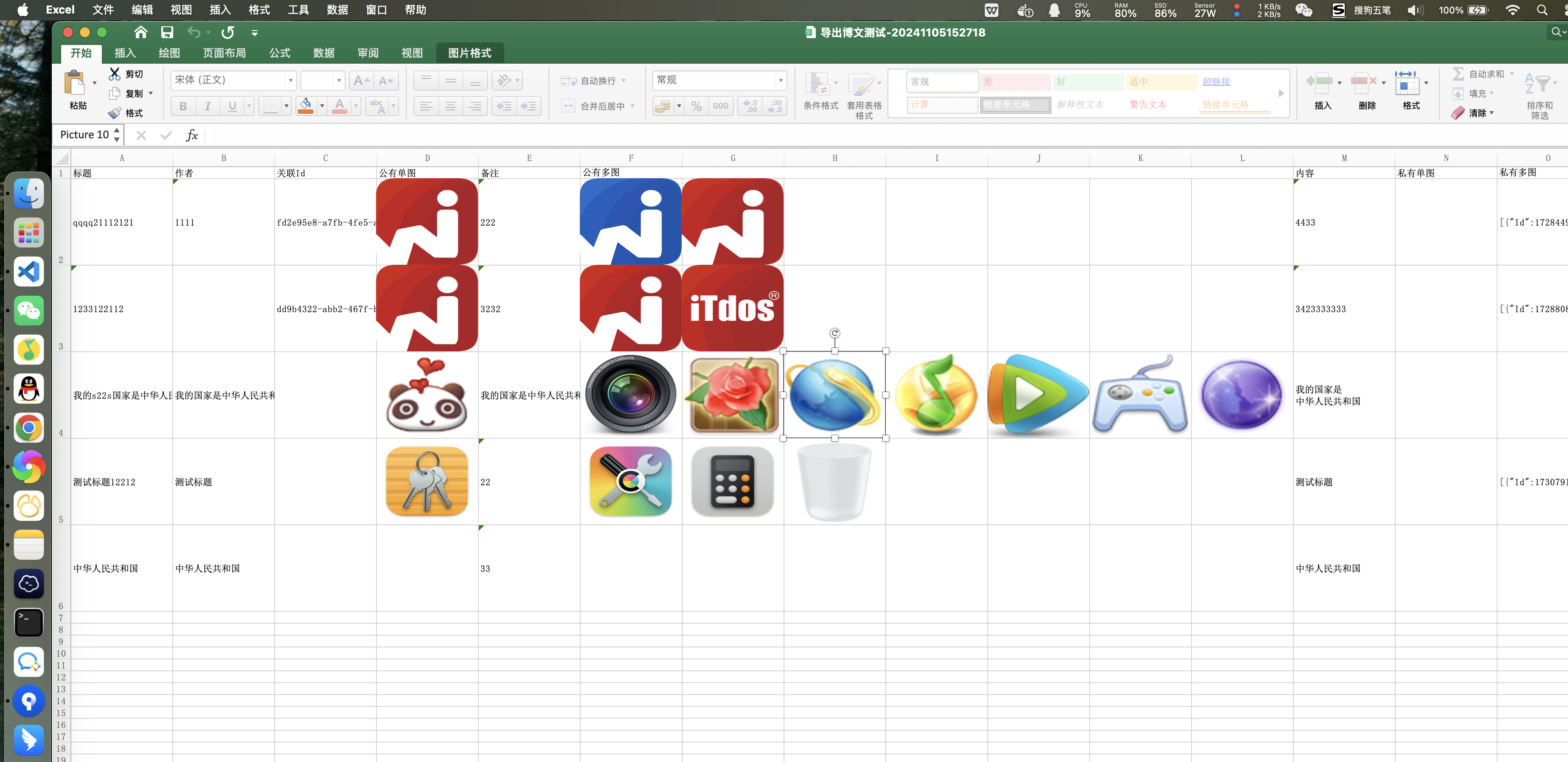
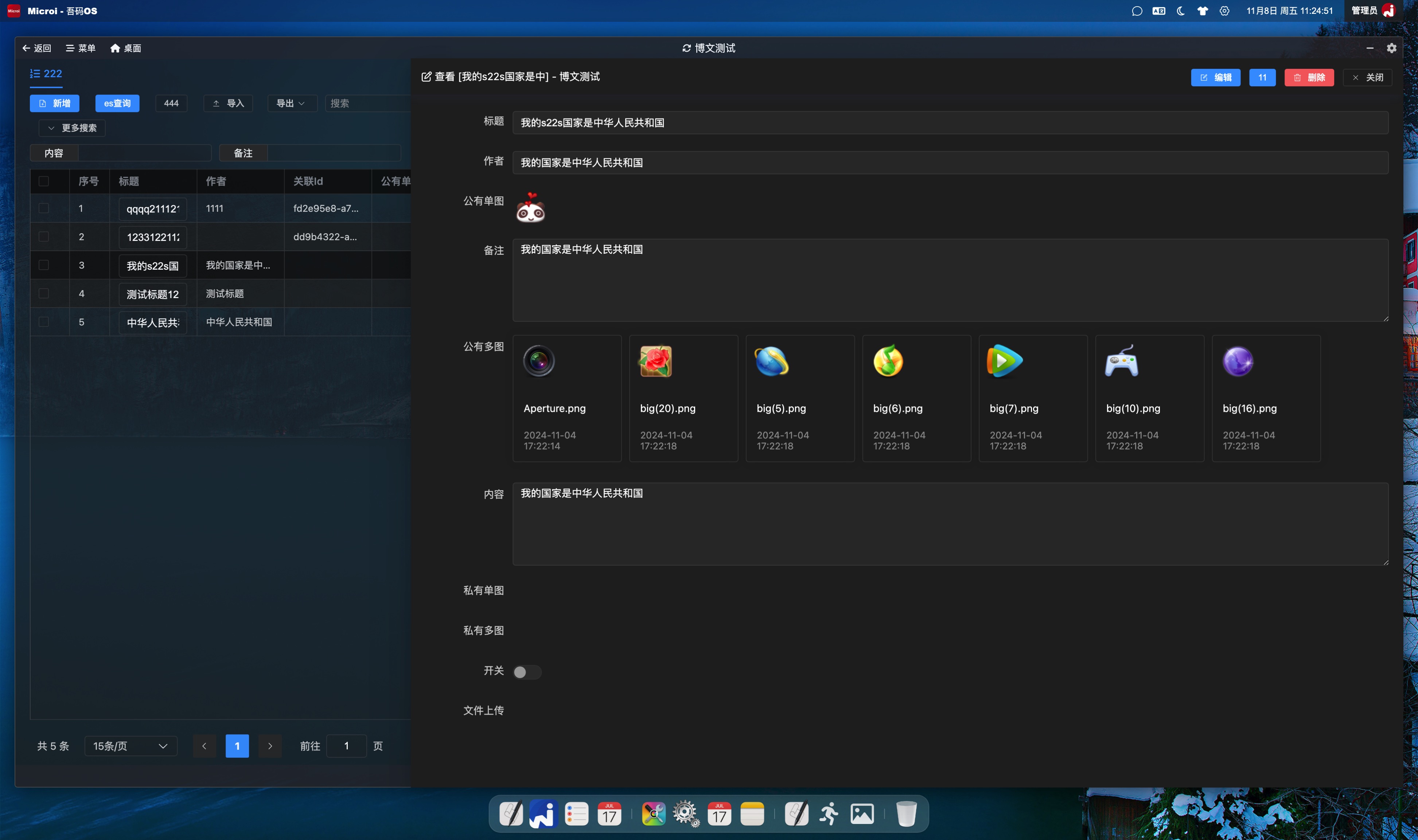
- 2024-11-04 supports exporting single and multiple graphs, and multiple graphs will automatically generate columns and merge columns, and automatically float on the corresponding cells on the table through calculation and positioning.
- The source code of the exported ExportExcel() method is publicly available in the [Microi.Office] plug-in source code
Rendering
Replacing an Export Interface with the Interface Engine
Expand to view JavaScript code (49 lines)
javascript
//新建一个接口引擎,代码如下:
//动态设置数据源
var dataListResult = V8.FormEngine.GetTableData('diy_blog_test', {
    _Where : [[ 'Xingming', 'Like', '张三' ]]
});
if(dataListResult.Code != 1){
    return dataListResult;
}
var dataList = dataListResult.Data;
//动态设置表头,数据可来源于【diy_field】表,也可以自己组装,这里使用JOSN示例数据
var header = [{
  Name: 'Biaoti', Label : '标题', Component : 'Text'
},{
  Name: 'ImgUpload57', Label : '公有单图', Component : 'ImgUpload',
  //传入Config.ImgUpload.Multiple=1会自动处理多图生成列、合并列,且通过计算定位自动浮在表格上对应的单元格
  Config : `{
    ImgUpload:{
      Multiple : 0,  //是否多图
      Limit : 0,  //公有还是私有
    }
  }`
},{
  Name: 'ImgUpload64', Label : '公有多图', Component : 'ImgUpload',
  Config : `{
    ImgUpload:{
      Multiple : 1,  //是否多图
      Limit : 0,  //公有还是私有
    }
  }`
}];
//导出excel。注:ExportExcel()方法的源码公开在【Microi.Office】插件源码中。
var excelResult = V8.Office.ExportExcel({
  OsClient : V8.OsClient,
  ExcelData : dataList,//传入动态数据源
  ExcelHeader : header,//传入动态表头
});
if(excelResult.Code != 1){
  return excelResult;
}
var excelByte = excelResult.Data;
//返回文件流。注意:接口引擎必须开启【响应文件】
return {
  Code : 1,
  Data : {
    FileName : '测试接口引擎导出excel.xls',
    ContentType : 'application/vnd.ms-excel',
    FileByteBase64 : System.Convert.ToBase64String(excelByte)
  }
};Replace the export interface with a custom interface
csharp
//按照常规C#开发接收前端的参数、获取数据、使用NPOI导出Excel即可,无特殊说明。
//具体代码可以参考【Microi.Office】中的【ExportExcel】方法,如对图片、样式、行列值的处理Custom Export Word
- Since 2026-06-30,
V8.Office.ExportWordText()can export plain text to a compact Word document. It is suitable for question banks, contracts, legal documents, and other line-preserving text exports.- The method returns
byte[]. Enable response file for the API engine and convert the bytes withSystem.Convert.ToBase64String().
JavaScript example
javascript
var content = 'Question: sample question\nOptions: A. one; B. two\nAnswer: A';
var wordResult = V8.Office.ExportWordText({
  OsClient: V8.OsClient,
  Title: 'Question Bank Export',
  Content: content,
  FontSize: 9,
  TitleFontSize: 14,
  Compact: true,
  SpacingAfter: 40
});
if (wordResult.Code != 1) {
  return wordResult;
}
return {
  Code: 1,
  Data: {
    FileName: 'question-bank.docx',
    ContentType: 'application/vnd.openxmlformats-officedocument.wordprocessingml.document',
    FileByteBase64: System.Convert.ToBase64String(wordResult.Data)
  }
};Receiving, downloading, and uploading files in the interface engine
Expand to view JavaScript code (line 62)
js
//接收到的文件列表
var filesByteBase64 = V8.FilesByteBase64;
var upResult1 = {};
if(filesByteBase64){
  //不建议使用调用接口的方式,性能较差,虽然也是可以的
  /*
  var upResult1 = V8.Http.Post({
    Url : V8.SysConfig.ApiBase + '/api/HDFS/Upload',
    FilesByteBase64 : filesByteBase64,
    PostParam : {
      Limit : false, //是否上传到私有桶
      Preview : false, //如果是图片,是否压缩
      Path : '/img'//上传到的路径前缀
    },
    Headers : {
      authorization : 'Bearer ' + V8.Method.GetCurrentToken().Token
    }
  });
  */
  //建议直接调用已封装好的上传函数
  upResult1 = V8.Method.Upload({
    FilesByteBase64 : filesByteBase64,
    Limit : false, //是否上传到私有桶
    Preview : false, //如果是图片,是否压缩
    Path : '/test-upload', //上传到的路径前缀
    //Multiple : true,//editor上传多张图片这个接口会调用多次,每次都是单图
    OsClient : V8.OsClient
  });
}

var downResult = V8.Http.GetResponse({
  Url : 'https://static.itdos.com/itdos/img/20230623/WechatIMG21753.png'
});
var imgByte = downResult.RawBytes;
//不建议使用调用接口的方式,性能较差,虽然也是可以的
/*
var upResult2 = V8.Http.Post({
  Url : V8.SysConfig.ApiBase + '/api/HDFS/Upload',
  FilesByteBase64 : { 'fileName1.png' : System.Convert.ToBase64String(imgByte) },
  PostParam : {
    Limit : false, //是否上传到私有桶
    Preview : false, //如果是图片,是否压缩
    Path : '/img'//上传到的路径前缀
  },
  Headers : {
    authorization : 'Bearer ' + V8.Method.GetCurrentToken().Token
  }
});
*/
//建议直接调用已封装好的上传函数
var upResult2 = V8.Method.Upload({
  FilesByteBase64 : { 'fileName1.png' : System.Convert.ToBase64String(imgByte) },
  Limit : false, //是否上传到私有桶
  Preview : false, //如果是图片,是否压缩
  Path : '/test-upload', //上传到的路径前缀
  //Multiple : true,//editor上传多张图片这个接口会调用多次,每次都是单图
  OsClient : V8.OsClient
});
upResult2.DataAppend = {
  upResult1 : upResult1
};
return upResult2;JS deals with floating-point calculation accuracy.
- add a custom calc function to [system settings]-> [development configuration]-> [global front-end V8 engine, global server-side V8 engine] to handle floating-point number precision
Expand to view JavaScript code (21 lines)
js
function calc(operation, ...numbers) {
    const multipliers = numbers.map(num => {
        const decimal = num.toString().split('.')[1];
        return decimal ? Math.pow(10, decimal.length) : 1;
    });

    const maxMultiplier = Math.max(...multipliers);
    const results = numbers.map(num => num * maxMultiplier);

    let result;
    switch(operation) {
        case '+': result = results.reduce((sum, curr) => sum + curr, 0); break;
        case '-': result = results.reduce((diff, curr, i) => i === 0 ? curr : diff - curr); break;
        case '*': result = results.reduce((product, curr) => product * curr, 1); break;
        case '/': result = results.reduce((quotient, curr, i) => i === 0 ? curr : quotient / curr); break;
        default: throw new Error('Unsupported operation');
    }

    return result / (operation === '*' ? Math.pow(maxMultiplier, numbers.length) :
                 operation === '/' ? Math.pow(maxMultiplier, numbers.length - 1) : maxMultiplier);
}
- Usage
js
//计算:0.005-0.002-0.0007
var a = calc('-', 0.005, 0.002, 0.00007);
//计算: (0.005-0.002)*2.2*(0.003-0.002)
var b = calc('*', calc('-', 0.005, 0.002), 2.2, calc('-', 0.003, 0.002));